Outpatient department management for hospitals and clinics
Shafa HMS OPD Management is the outpatient module of the Shafa hospital management suite. It covers patient registration, doctor appointments, token and queue control, consultation notes, e-prescriptions, follow-up bookings and OPD billing for hospitals, polyclinics and specialist chambers in Bangladesh. Reception, doctors and the cash counter work from one patient record, so a visit that starts at the front desk ends with a settled invoice without re-entry. Prescriptions written in the consultation room reach the Pharmacy module, test orders reach the laboratory, and charges post to Accounts. The interface is available in Bangla and English, and clinics keep working through connectivity loss with offline sync.
- Token queues visible at every counter
- E-prescriptions delivered straight to pharmacy
- Bangla and English interface
- Keeps registering when the internet drops
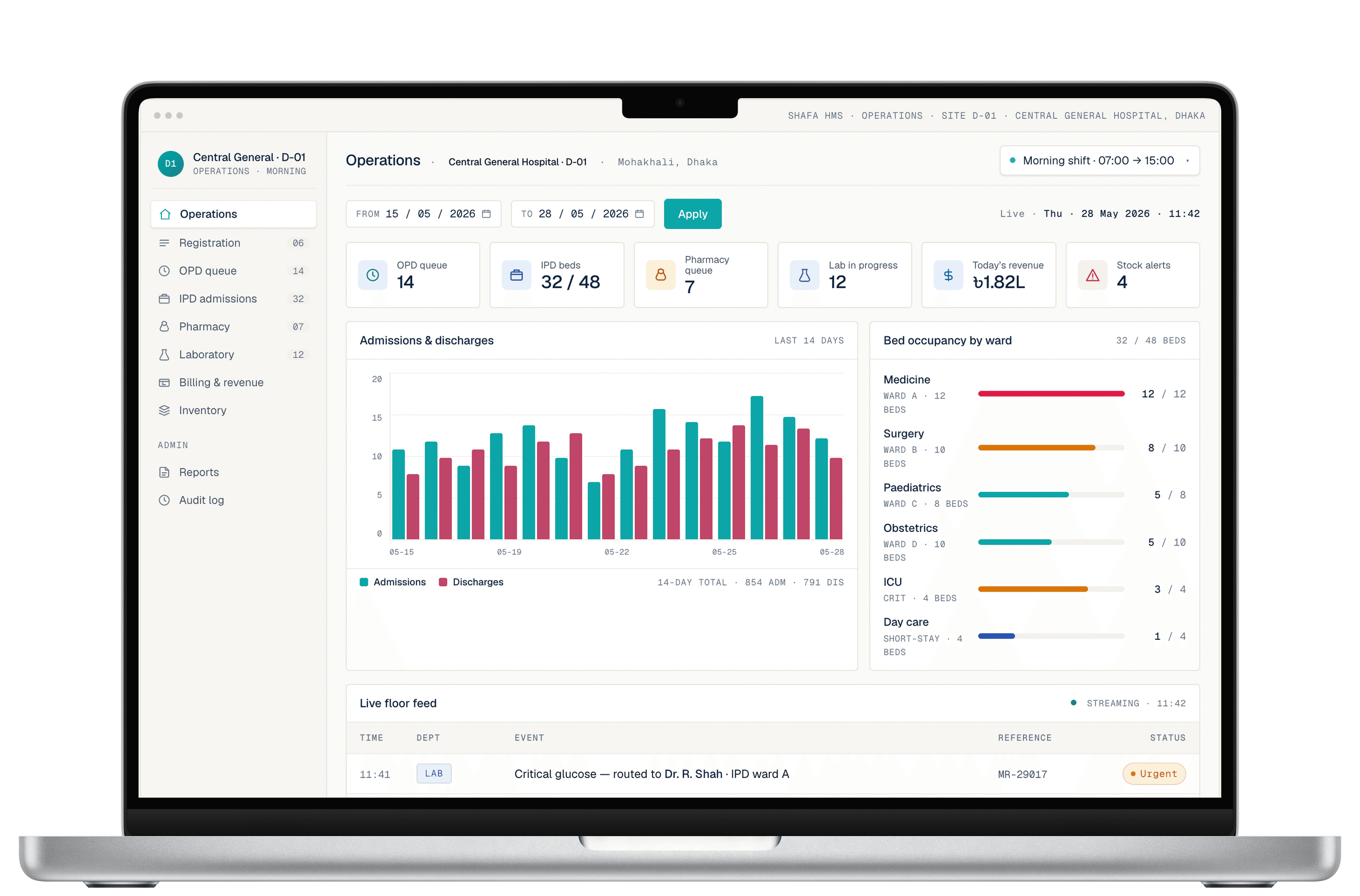
Overview
What the OPD module does
An outpatient department handles more patient contacts per day than any other part of a hospital, and most of the friction sits in handovers: a slip written at reception, a token called by voice, a prescription copied by hand at the counter. The OPD module replaces those handovers with a single visit record. A patient is registered or found once, given a token, seen by the doctor, and billed, with each step reading from the step before it.
It is built as an outpatient management system for the way clinics in Bangladesh actually run: several doctors sitting in parallel, morning and evening sessions, walk-ins mixed with booked appointments, and a cash counter that must reconcile at the end of every shift. Queue boards, doctor-wise session lists and shift-wise collection reports are standard views rather than custom reports, and every entry is attributed to the user who made it.
Because the module is part of Shafa HMS rather than a standalone product, the outpatient record is the same record that follows the patient into admission, surgery or the laboratory. A diagnosis coded during an OPD visit is visible on the ward. A follow-up scheduled at discharge appears in the OPD calendar. Nothing is exported and re-imported between departments, and no patient is registered twice because they came in through a different door.
Capabilities
OPD capabilities
Each capability reads from and writes to the same visit record, so nothing is entered twice between the front desk, the consultation room and the counter.
- 1
Patient registration and visit records
Register a new patient with demographics, contact details, referral source and a unique hospital ID, or find a returning patient by phone number, ID or name. Each visit is recorded against that ID, so history, allergies and previous prescriptions are available before the consultation begins. Duplicate detection runs at the point of entry.
- 2
Doctor appointment scheduling
Maintain a calendar for each doctor with session times, slot lengths and leave days, and book patients into it from reception or over the phone. Walk-ins and booked patients share one queue with configurable priority rules. SMS reminders go out ahead of the visit, and cancelled slots return to the pool for rebooking.
- 3
Patient queue and token management
Issue a token at registration and let the patient queue management system do the calling. Each doctor's room sees the current and next tokens, the same numbers can be shown on a waiting-area display, and the token status moves from waiting to in consultation to completed without anyone updating a register by hand. Priority patients can be moved up.
- 4
Consultation notes and e-prescriptions
The doctor's screen opens on the patient's history, vitals recorded at triage and any pending lab results. Complaints, examination findings and diagnoses are entered as structured fields with free text where needed. The e-prescription is built from the hospital's own drug list, printed for the patient, and sent electronically to the Pharmacy module for dispensing.
- 5
Follow-up scheduling and recall
A follow-up date set during the consultation becomes a booking in the doctor's calendar and a reminder for the patient. Chronic-care patients can be placed on a recall list, and reception sees who is due and who has missed. Follow-up visits are linked to the original episode so the doctor sees the course of treatment, not isolated visits.
- 6
OPD billing
Consultation fees, procedure charges and investigation costs are captured as the visit progresses and settled at the counter in one invoice. Doctor-wise fee schedules, discounts with approval limits, corporate and insurance billing, and refunds are all supported. Every receipt is numbered and traceable, and shift-wise collection reports close the day for the cashier and the accounts team.
- 7
Outpatient reporting and MIS
Daily and monthly OPD registers, doctor-wise patient counts, new versus follow-up ratios, average waiting time per session and revenue by service are available as standard reports. Figures can be exported for management review or arranged in the formats used for DGHS reporting, drawn from the same visit records rather than compiled by hand at month end.
Suite fit
How OPD fits the rest of Shafa HMS
The OPD module is the front door of the suite. Most patient journeys begin here, and the data captured at registration and in the consultation room is what the diagnostic, dispensing and finance modules work from. These are the flows that run automatically once the modules are live together.
- OPD consultationtoPharmacy
E-prescriptions arrive at the dispensing counter with patient ID, drug, dose and duration, ready to dispense and bill.
- OPD consultationtoLaboratory (LIS)
Investigation orders create sample requests in the laboratory; results return to the doctor's screen and the patient's record.
- OPD billingtoAccounts
Consultation and service charges, discounts and refunds post to the ledger with cashier and shift attribution.
- OPD visittoIPD and OT
When a patient is admitted or listed for surgery, the outpatient history, diagnosis and medications carry over without re-registration.
Standards and compliance
Standards and data controls
The controls below apply to the OPD module as part of the suite.
HL7 FHIR-based data exchange
Patient, encounter, observation and medication data are structured on HL7 FHIR resources, so an OPD visit can be shared with another system or a national registry without a bespoke export.
Role-based access and audit logs
Reception, doctors, cashiers and administrators each see only what their role permits. Every view and edit of a patient record or an invoice is written to an audit log with user and time.
Encryption in transit and at rest
Patient data is encrypted between the browser and the server and in storage and backups, following HIPAA-style data handling practices for protected health information.
Bangla and English interface
Reception and clinical screens are available in Bangla and English, and each user chooses their own language. Reports can be produced in the formats used for DGHS reporting.
Deployment
Deployment options
The OPD module runs in whichever deployment shape the facility chooses for Shafa HMS as a whole. Cloud is the quickest to provision and carries the least infrastructure burden; on-premise keeps the data inside the building; and offline sync covers the connectivity gaps that every clinic in Bangladesh plans around. Facilities can move between shapes later.
Cloud
Hosted by Shafa Care with a separate database per facility. Backups, monitoring and updates are included, and new OPD counters or doctors' rooms are added without any hardware beyond a browser.
On-premise
The full module installed on servers inside the hospital, with the facility owning and hosting its own data. Suited to government hospitals and large referral centres with data-sovereignty requirements.
Offline sync
A local edge node keeps registration, tokens, consultations and billing running when the internet link fails. Queued actions synchronise in order when the connection returns, with no duplicate patients or lost prescriptions.
Who it is for
Who the OPD module is for
Hospital administrators
Managers of private and public hospitals who need outpatient volumes, waiting times and collections visible by doctor and by session, and who want the OPD to feed admissions and finance without a second data-entry team.
Doctors and consultants
Physicians running high-volume sessions who want the patient's history on screen before the patient sits down, a prescription that takes less time to write than by hand, and follow-ups that book themselves.
Polyclinics and diagnostic centres
Multi-doctor chambers and diagnostic centres where the same reception handles consultations and investigations, and where a shared token system and a single bill per patient remove most of the counter disputes.
FAQ
Frequently asked questions
How is the OPD module priced?
Shafa HMS is licensed as a subscription, priced per facility according to the modules in use and the scale of the operation. There is no published price list because an OPD for a twenty-bed clinic and one for a multi-specialty hospital are very different deployments. Contact us with your doctor count, daily patient volume and preferred deployment model and we will prepare a quote.
Can we use the OPD module on its own, without the rest of Shafa HMS?
The modules are designed to work together and to be rolled out in phases. A common first phase is OPD, registration and billing, with Pharmacy, the laboratory or IPD added once the front desk is settled. Whichever modules you start with, the patient record and the billing structure are shared, so later phases build on the data already in the system rather than starting again.
We currently run the OPD on paper and Excel. How do migration and training work?
Existing patient lists can be imported from spreadsheets so returning patients are found rather than re-registered on day one. Doctor schedules, fee lists and the drug formulary are configured before go-live, and reception, doctors and cashiers are trained on their own screens with their own data. Paper history is not back-entered; the doctor summarises what matters on the first digital visit. We recommend running the paper register in parallel for a short period, then stopping.
Does the OPD module produce the reports DGHS asks for?
OPD registers, disease-wise counts and monthly outpatient summaries can be generated from the visit records and arranged in the formats used for DGHS reporting. Because diagnoses and visits are recorded at the point of care, the monthly return is a report run rather than a compilation exercise. Shafa Care works with DGHS on national digital-health initiatives and tracks changes to these formats.
Is the interface available in Bangla?
Yes. Every screen in the OPD module is available in Bangla and in English, and each user selects their own language, so a receptionist can work in Bangla while a consultant works in English on the same visit. Patient-facing outputs such as tokens and receipts follow the facility's configuration.
What happens to the queue and billing when the internet goes down?
With offline sync enabled, a local edge node keeps registration, token issue, consultation notes and billing running exactly as before. Actions are queued locally and synchronised in order once the connection is back, so no token numbers are skipped and no receipts are duplicated. Staff see a sync status indicator and do not need to change how they work during the outage.
Who owns the patient data, and can we export it?
The facility owns its data in every deployment model. On-premise installations hold the data on the hospital's own servers; cloud deployments use a separate database per facility. Patient records, visit histories and billing data can be exported in standard formats, including FHIR resources, at any time, and the same applies if you decide to stop using Shafa HMS.
Shafa HMS · OPD
See the OPD module with your own patient flow
Bring a typical morning session: your doctor list, your fee schedule and your busiest hour. We will walk through registration, tokens, consultation and billing on Shafa HMS and show where the time goes.